 On Point Business
Know where you stand.
Your manager uses On Point to recognize good work as it happens. Join and you'll see every point, every note, and how you're doing on your team.


Free for employees, always. iPhone and iPad.
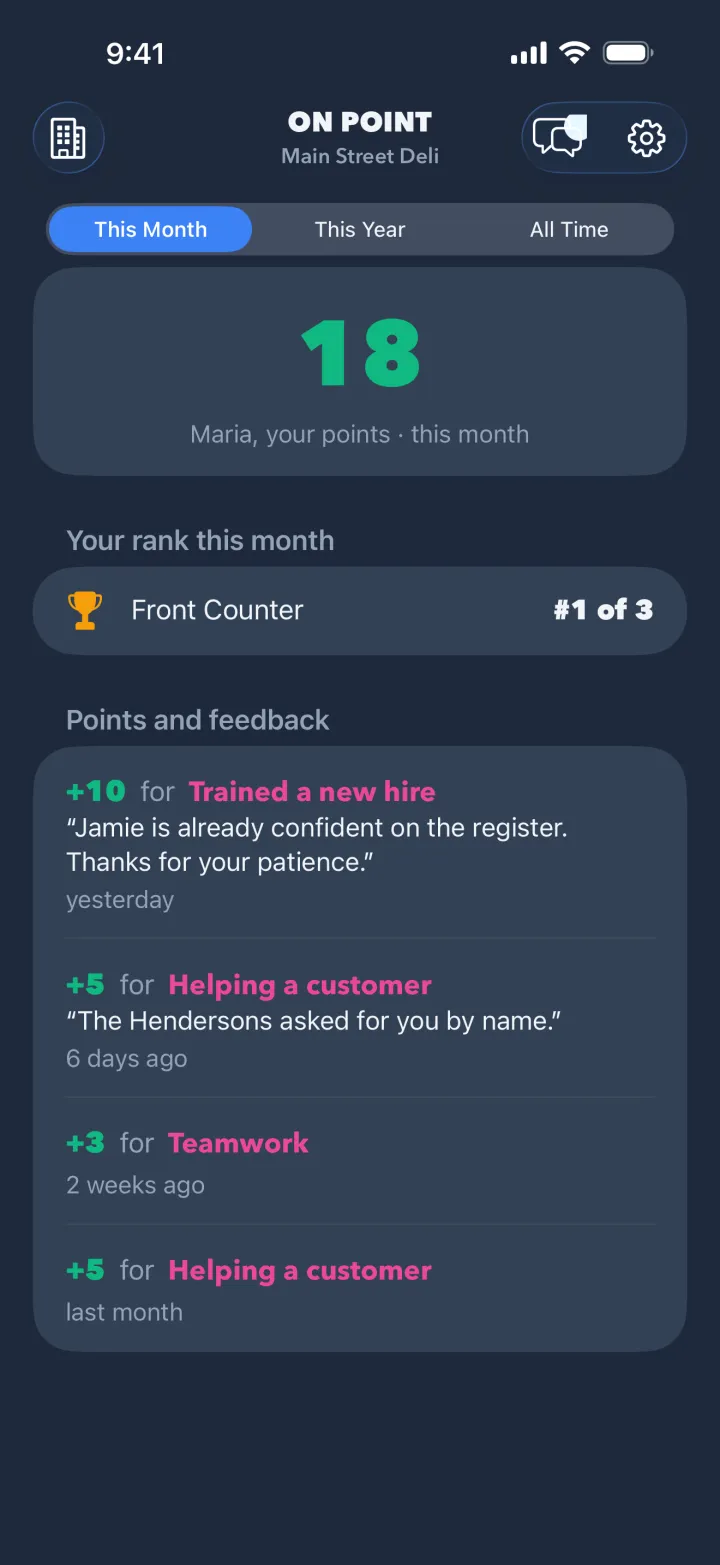
What you'll see
Your score
Your points this month, this year and all time, and your rank on each of your teams.
Every award, with the reason
Each award and deduction, what it was for, and your manager's note. You're notified when a new one arrives.
Your manager, in one place
A private chat with your manager, and your team's announcements.
Private by design
You see your own points and feedback. Your coworkers see theirs. Nobody sees anyone else's.
- Your manager sees the awards they and the business give, your score, and your chat with them.
- You see your own score, rank, awards, notes, chat and announcements. Your rank says where you are ("#3 of 12"), not who is ahead of you.
- No ads, no tracking. You can delete your account from the app at any time. See the privacy policy.
How to join
Your manager adds you first, then invites you one of two ways.
Get the app
Download On Point Business from the App Store. It's free.
Use your invitation
A personal invitation (an email, a link or a QR code): open it on your iPhone, or open the app, choose I Was Invited and type the code. A team join code at a shift meeting: scan it, choose your own name, and your manager approves you.
Create your account
Sign up with your own email. Your scoreboard is there as soon as you're in.
Each personal invitation works once and expires. If yours has expired, or you were sent the wrong one, ask your manager for a new one.
Questions
Do I have to pay?
No. On Point is free for employees, always. Only the business has a plan.
I have an Android phone.
On Point is on iPhone and iPad for now. An Android app for employees is planned. Your manager can still give you points, and you'll see them all once you can join.
I work at more than one place.
Join each one with its invitation. You switch between them in the app, and each business sees only its own awards.
I left the job. What happens to my account?
Your manager can remove you from their business. Your account stays yours: delete it from the app at any time, or keep it for your next job.
Something isn't working.
In the app, choose Settings → Contact Support, even if you aren't signed in. More on support.